Showing posts with label Lenovo. Show all posts

Monday, February 6, 2017

His name is Legion: Review of gaming notebook Lenovo Legion Y520

On the market is gradually coming out more and more on the basis of models of notebook platform Intel Kaby Lake-S and the new generation of graphics cards NVIDIA GTX 10xx. Moreover, such devices exist not only in the higher price segment but gradually accustom to average. One such example is Lenovo Legion Y520, combining a high level of performance, as well as good design.

LENOVO LEGION Y520 REVIEW AND TEST

APPEARANCE: LENOVO LEGION Y520

Although the positioning of the Lenovo Y520 as a game model, in its exterior that gives a little orientation. The notebook looks strict, but not boring. The essence of the game represent only a rather massive air ducts on the rear face and red border of the touchpad buttons.
Lenovo Legion Y520 Review of gaming notebook: Test and Specifications
The body is made of black matte plastic with soft touch coating. This option is not the most practical: on such surfaces fingerprints, although they are easily removed and are not very visible. When looking at the laptop becomes clearly visible that the designers tried to make the Y520 compact than it actually is.

HOUSING MATERIAL AND WEIGHT AND OVERALL DIMENSIONS

Lenovo Legion Y520 Review of gaming notebook: Test and Specifications
We are dealing with a common form factor of 15.6-inch and quite trivial dimensions. The shell thickness of 25.8 mm, which in combination with the tapered faces creates the effect of a compact design. the laptop weighs 2.4 kg.

INTERFACE LAYOUT: LENOVO LEGION Y520

By the number of the laptop of Lenovo Legion Y520 interfaces are not breaking records, but all you need in it, and even a little more. Let’s start with the left side. On it are Kensington lock, a connector for the charger, Gigabit LAN-port, USB 2.0, combined 3.5 audio jack and slot to restart the device.
The right side contains the USB mode Type-C, card reader SD format, a pair of USB 3.0 and HDMI. The front and rear faces are blank.

KEYBOARD AND TOUCHPAD: LENOVO LEGION Y520

Lenovo Legion Y520 is equipped with an island keyboard with numeric keypad. last dimensions were sacrificed size arrows unit and the main part – a very competent solution for the gaming models. Key scissor design and have minimal progress and necessary force to press. Using the keyboard is very pleasant both in games and in the recruitment of large volumes of text. The keyboard has backlit red color, the brightness of which is regulated within two gradations.
Lenovo Legion Y520 Review of gaming notebook: Test and Specifications
Pro touchpad especially nothing to say. It is of medium size and no claims against him. It is worth mentioning except that the slope of the sensor surface towards the user and the keys hard enough.

DISPLAY: LENOVO LEGION Y520

As the display uses a 15.6-inch IPS-matrix LG production. The resolution is 1920×1080 pixels. According to the measurements, the minimum brightness level is 2 cd / m2, maximum – 201. This range is almost always enough, especially like to mention the minimum – with a level of use of a laptop in the dark, extremely comfortable. The measured contrast ratio is 1: 700.
Lenovo Legion Y520 Review of gaming notebook: Test and Specifications
The image is characterized predominantly warm colors of the image. Gamma can not be called a reference, there is also a shift towards green and red colors. Subjectively, the picture is pleasing to the eye. The same can be said about the viewing angles, traditionally for the IPS is the maximum. The only drawback, which can be noted – yellow glare illumination that can be seen only in the dark on a black background.

LENOVO LEGION Y520: SPECIFICATIONS

HARDWARE PLATFORM AND PERFORMANCE: LENOVO LEGION Y520

Filling laptop deserves attention – because it is based on the latest at the moment the platform Kaby Lake-S, and one of the top-end of its representatives – Intel Core-i7 7700HQ. This quad-core processor with Hyper Threading support. From its predecessor, the model Core-i7 6700HQ, it is distinguished by several characteristics. Firstly, the increased nominal frequency of 2.8 GHz, and model Turbo Boost – 3,8 GHz. Recall from the previous model, the frequency was 2.6 and 3.5 GHz, respectively. CPU TDP not increased and not decreased, and remains at 45 watts, which is a lot for a mobile device. Process technology – 14 nm. Secondly, we are dealing with a new graphics core – Intel HD Graphics 630. The main difference from the model 530 – a slightly increased frequency.
Lenovo Legion Y520 Review of gaming notebook: Test and Specifications
Processor performance is high, as in the games, and the synthetic benchmark. Hyper-Threading technology advantage, of course, users will notice the multi-threaded applications. A good addition to the powerful processor is 16 GB DDR4 memory standard with a clock speed of 2133 MHz.

GAMING PERFORMANCE: LENOVO LEGION Y520

As a graphics adapter is installed mid-range GTX Ti 1050 with 4 GB of graphics memory. His performance is enough for any modern games in resolution Full HD, as we have seen well during testing. Thus, the Ti 1050 allows almost always show a stable 60 frames per second with a combination of high-quality graphics settings. Heavy anti-aliasing modes like MSAA and ultra settings instantly put the card on his knees, so do not forget that we are talking about the decision of the initial medium level.
Lenovo Legion Y520 Review of gaming notebook: Test and Specifications
Configuration Intel Core-i7 7700HQ and GTX 1050 Ti, which is equipped with a Legion Y520, allows without any problems to play any games on highest graphics quality settings. On the other hand, this example is not ligament balance between CPU and GPU. In most cases, the processor was rarely above 60-70% load, but card virtually always 100%.

MEMORY: LENOVO LEGION Y520

The disk subsystem is represented by 512 GB SSD with a PCI interface, for storing multimedia files is hard disk 1 TB. Very fast SSD makes a significant contribution to the overall performance that is clearly seen in all the daily tasks associated with the processing of the files on the system drive. Hard disk speed of Records does not set, but it does its job. It is quiet enough, and the movement of its magnetic heads can be heard only in silence.

COOLING: LENOVO LEGION Y520

In order to maintain the correct temperature rather powerful components, a pair of fans. The level of noise can not be called a laptop silent in idle mode, and even more so in games. However, in both cases, the sound emitted by the cooling system is within acceptable limits. The output of hot air is carried back, which is also a plus, because it does not burn your hands and additionally leads away from the noise of the notebook user.
Lenovo Legion Y520 Review of gaming notebook: Test and Specifications
Worth noting and efficient cooler. The synthetic test AIDA64 CPU temperature was fixed at 75-80 degrees with the short-term increase to 90. In this case, the processor is in Turbo Boost mode at a frequency of 3.4 GHz. Very good for a notebook with a Core-i7 and body thickness of less than 26 mm. In games, the temperature hovered near 75 degrees and rarely exceed this threshold. Video and all was quite cold, the temperature in almost all gaming applications at maximum load was at 70 degrees.

MULTIMEDIA: LENOVO LEGION Y520

As a speaker system uses a pair of speakers from Harman with a capacity of 2 watts each. They sound clear and loud enough. Also, the laptop is equipped with HD-webcam.

AUTONOMY: LENOVO LEGION Y520

Lenovo Legion Y520 is equipped with a standard for this form factor batteries 45 W / h.
A full charge will be sufficient for about 1.5 hours of battery life at a level lower than the average brightness and use office applications and web surfing. Games Launch plant a battery in about 15-20 minutes.
PROS of Lenovo Legion Y520: design; performance; good cooling system;
CONS of Lenovo Legion Y520: there are not practically.

CONCLUSION: LENOVO LEGION Y520 RELEASE DATE AND PRICE

LENOVO LEGION Y520 we liked. It combines very high performance, low-key but stylish design, good display and general equipment. The notebook offers gamers an excellent gaming performance, good cooling in a suitable size. Y520 price for the European market depending on the equipment will be in the range of 1290 to 1470 USD, taking into account the equipment is very good. Taking into account all of the above, we can safely recommend buying a laptop to anyone who wants to play your favorite games everywhere and not particularly willing to donate the amount of fps. Moreover, the laptop is no specific compromises that sometimes you have to go when buying gaming models.
Source: Lenovo


Title: His name is Legion: Review of gaming notebook Lenovo Legion Y520
Updated: 2017-02-06 

Sunday, January 29, 2017

Foldable smartphone: a small excursion into the history of the concept

Already this year, several manufacturers are threatening to release a foldable smartphone. In general, as long as such statements should be treated rather skeptically, but is itself a concept device that flick of the wrist turns a smartphone into a tablet, is discussed for a long time.
The idea itself is really good: it is much more convenient to have one of the two gadgets. Hitherto we tried to solve this problem in different ways. For example, the ASUS PadFone released a special line of smartphones that by setting the docking station converted into a tablet.
In principle, a good solution, which is quite right to exist, but with a big minus in the form of significant size. For this reason, ASUS PadFone has never enjoyed great popularity, and, in general, the future is the uncertain line.
Foldable smartphone: a small excursion into the history of the concept
As an alternative, some manufacturers offer a smartphone equipped with a miniature projector. Samsung released several similar “production concept” in the family Galaxy Beam. Understandably, they simply could not miss the media, but the demand is clearly not consistent with the expectations of marketers.
Cons here just two. First, for however picture quality, you need a good projection screen. Secondly, the problem of management. Poking a finger in the projected image can be, and even scan these gestures are also real. However, neither of which feedback can not even dream of.
And what we’re left with? Correctly:

CREATE FOLDABLE SMARTPHONE

SAMSUNG

Among the first, Samsung turned out again that during the second half of 2015 showed a similar video on the device, codenamed Project V (Valley). Just shortly before the flexible OLED-screens have been demonstrated.
Foldable smartphone: a small excursion into the history of the concept
Last year there were rumors that the Koreans will present such an unusual concept in the “hardware” later this year, called the Galaxy the X, but it is already known that the output of the device is removed for an indefinite period.

NEC

Foldable smartphone: a small excursion into the history of the concept
In 2013, the mobile market now abandons the company showed a very interesting gadget called Medias W N-05E. The device is a smart folding of two halves, each of which had by the 4.3-inch screen with a resolution of 540 x 960 pixels.
Foldable smartphone: a small excursion into the history of the concept
However, as a full-fledged tablet to use a transformer NEC did not work: all the fault visible frame around the display, and the gap between them and the lack of ready-made software platform for comfortable operation. Probably for this reason Medias W N-05E sold exclusively through Japanese mobile operator DoCoMo.

XIAOMI

One of the largest Chinese manufacturers of smartphones also promises to release the folding (or flexible) smartphone. The company even recently received the patent. As in the case of Galaxy X, the gadget will fold out like a book.

MICROSOFT

Foldable smartphone: a small excursion into the history of the concept
Perhaps the most unusual, and at the same time, the most detailed in the patent version of the foldable smartphone lineup Surface unveiled the company that created of Windows. The device can not only be decomposed into a tablet but transformed into a smartphone with a convenient stand.

LG

Another Korean electronics maker also could not be on the side and registered a patent which discloses very original foldable smartphone: its flexible OLED-touch screen as it is wrapped around the body.

LENOVO

Foldable smartphone: a small excursion into the history of the concept
The Taiwanese company went further and not only registered the patent but also introduced in the summer of 2016 the prototype of the convertible tablet with the 10-inch screen that can be folded like a book screen outside and use a phablet.
Foldable smartphone: a small excursion into the history of the concept
The device allows you to make calls even. However, mass production is still so far away. Nevertheless, the experience of Lenovo shows that until the folding phablet market remains very little.

OTHER MANUFACTURERS

Of course, only the above-named companies is not limited. For example, the Oppo Chinese, who recently became the leader in the China market among smartphone manufacturers, in May 2016, presented her working partially foldable tablet concept.
Foldable smartphone: a small excursion into the history of the concept
So it may well happen that it will be vendors from China by these pioneers.

WHY DO I NEED IT?

We have already written that the smartphone market is now in a stage of stagnation. The growth performance of processors, amount of memory is still going on, but for a comfortable run, most applications and solutions lacking 2-year-old.
In addition, in recent years the vast majority of smart phones look almost the same: monoblock with a large touch screen for most of the front surface and a minimum of other controls.
Every other Chinese smartphone Apple iPhone copies the design of the latest series, one in three – the flagship Samsung Galaxy S. When a full line of the curved screen is too expensive, it makes it a cheap imitation and proudly calls it 2.5D-effect.
You can certainly make the screen even almost the entire front of the smartphone, like Xiaomi Mi Mix, but essentially it does not change, just a little unusual here design. The foldable smartphone – is really unusual and always interesting. As far as it is practical – it depends on how it can realize manufacturers.


Title: Foldable smartphone: a small excursion into the history of the concept
Updated: 2017-01-27
Author: Dan Green

Friday, January 27, 2017

Lenovo ThinkPad 11e and ThinkPad Yoga are the new laptops, the company suitable for students

Lenovo used BETT 2017 event in London to present their new products focused on educational institutions. These include updated versions of laptops ThinkPad 11e and ThinkPad 11e Yoga, which are part of “Intune for Education” program on Microsoft to promote Windows 10. Lenovo confirmed that they intend to present versions of devices that work with Chrome OS. By the end of the year, we will see three new Chromebook the company.

LENOVO THINKPAD 11E: SPECIFICATION

Lenovo ThinkPad and ThinkPad 11e Yoga are the new laptops for students
The new Lenovo ThinkPad 11e has an 11.6-inch display with HD resolution of 1366×768 pixels and can be configured with 128GB or 256GB SSD drives forward DigitalTrends. Users will have the option to select the Intel Core i3-6100U, Celeron N3150 or Pentium 4405U processor. RAM is 8GB, and graphic chips are Intel HD 520. Other features include HD webcams, support for Bluetooth, 42Wh battery, SD card reader and USB 3.0 ports.

LENOVO THINKPAD 11E AND THINKPAD 11E YOGA: RELEASE DATE AND PRICE

Lenovo ThinkPad and ThinkPad 11e Yoga are the new laptops for students
According to official data ThinkPad 11e and ThinkPad Yoga offer up to 10 hours operating time on a single charge, water resistant keyboards and Gorilla Glass coatings. The hybrid version of the laptop is compatible with a stylus Windows Ink. Official sales of laptops starting in February. The price of the Lenovo ThinkPad 11e is $ 419 while the ThinkPad 11e Yoga will cost $ 599. Their versions of a Chrome OS will be able to buy from May.
Source: Digitaltrends


Title: Lenovo ThinkPad 11e and ThinkPad Yoga are the new laptops, the company suitable for students
Updated: 2017-01-25
Author: Dan Green

Saturday, January 9, 2016

Lenovo K4 Note Specs: More Details and Videos

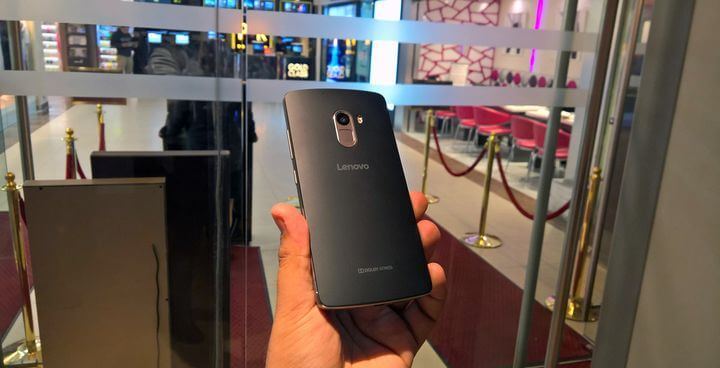
At the time, the price and performance Lenovo K4 Note specs were considered one of the most attractive 5.5-inch smartphone. It even now sells well, even though more than Xiaomi Redmi Note 2, which is slightly better filling.
It is clear that after such success expectations for the next model is very high. But contrary to the hopes of many fans K4 Note disappointed, and all because of a shortage. Instead of the expected processor Helio X10, the novelty has received mediocre MT6753, which is even weaker than its predecessor MT6752.
Lenovo K4 Note Specs: More Details and Videos
Among the main improvements is worth noting increased to 3 GB of RAM, the appearance of a fingerprint scanner and high-quality audio in this segment. It is known that uses a chip inside the machine Wolfson WM8281, the front speakers and two surround technology support Dolby Atmos.
Also, it should be noted completely new design K4 Note. In contrast, not a practical form of “bricks” at the K3 Note, the new model has narrower sides, which should have a positive impact on ergonomics. Like its predecessor, the plastic casing, but made a metal frame.

Features of the Lenovo K4 Note specs:

  • Android 5.1 operating system with the shell Vibe UI
  • 5-inch IPS FHD display, Gorilla Glass 3
  • 8-core MediaTek processor with a clock speed of 1.3 GHz.
  • 3 GB RAM
  • 16GB flash drive, support for microSD memory cards of up to 128 GB
  • Dual SIM
  • 13-megapixel rear camera with ISOCELL two-color LED-flash and PDAF focus, the front – 5 megapixel
  • The fingerprint scanner
  • Audio: Wolfson WM8281, the two front speakers with Dolby Atmos, three microphones
  • Other: NFC, Wi-Fi 802.11ac, Bluetooth 4.0, NFC and A-GPS
  • Dimensions 153,6 × 76,5 × 9,15 mm (minimum thickness 3.8 mm)
  • Weight 158 g
  • The battery in the 3300-3400 mAh
In India, where smartphone Lenovo K4 Note specs presented, the price will be about 180 dollars the US. In China, the price should be lower, but when K4 Note there will not be confirmed.
Source: device-boom

Wednesday, December 30, 2015

Review laptop Lenovo IdeaPad 100-15

Recently, Lenovo particularly pleased their fans replenishment model series laptops. It is noteworthy that produced diverse models, both low cost, and premium. In this review we will focus on low-cost segment representative – review laptop Lenovo IdeaPad 100-15, oriented to meet the daily needs of computer users.
This 15-inch gadget is hardly representative, but it is ideal for the home or office interior. Heavy duty, he also is not, however, to “povsednevku” – this is a great option! Well, let’s not beat around the bush, and move closer to the point.

Design: review laptop Lenovo IdeaPad

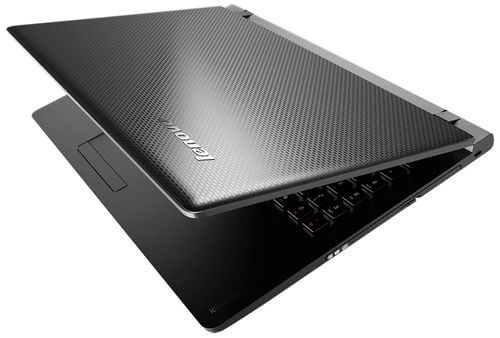
The manufacturer claims that the review laptop Lenovo IdeaPad 100-15 – an entry-level device. He assured that the gadget for those users who are just starting to develop laptops, as well as everyone who sees no reason to spend money unnecessarily on them. Accordingly, with the appearance of the laptop engineers are not particularly wise. First, it is entirely made of plastic, practical black. The cover has an interesting textured coating pleasing to the touch. Although it is currently delayed on fingerprints, but not so active that it was a problem. At the top, there is a small logo and nothing else.
Review laptop Lenovo IdeaPad 100-15
When you open the laptop immediately apparent high hinges that form a decent gap. In functionality it has no effect, but, in general, it looks very good. The screen is surrounded by a not very wide frame on the upper side which flaunts a webcam. The surface is plastic, and also black. The keyboard and touchpad look quite comfortable.
Review laptop Lenovo IdeaPad 100-15
Dimensions of the review laptop Lenovo IdeaPad are 378h265h23 mm and weighs 2.31 kg. In general, it is safe to throw it in your bag and do not be afraid to excessive gravity on his shoulder. But with the build quality is not so simple: the cover is easily deformed when the latter pressure, so accidental exposure to the housing device to be feared, so as not to damage its integrity.

Display, sound, and webcam: review laptop Lenovo IdeaPad

Regardless of what you choose a complete set, the characteristics of the screen are each identical. Thus, the device is equipped with the 15.6-inch display with a fairly modest by today’s standards, a resolution of HD (1366×768 pixels) and the density of pixels per inch – 100 ppi. As you have probably guessed, the screen is not a strong point of this laptop and do not need to be an expert to understand it. The maximum brightness level does not even reach 250 cd / m2, a contrast ratio of better things – 546: 1. Match sRGB scheme is only 54% AdobeRGB and even less – 47% and these figures are considered to be quite low. The color rendition, in general, also leaves much to be desired: the image is pale and unrealistic.
Review laptop Lenovo IdeaPad 100-15
The display is based on the TN-matrix, so the viewing angles are very limited. In addition, it is better not to use a laptop in the street, because of the glossy surface and the absence of the anti-reflective coating, consider something on the screen, it will be extremely difficult. Of course, all these facts speak clearly for the benefit of review laptop Lenovo IdeaPad 100-15, but what can you do a budget laptop.
Review laptop Lenovo IdeaPad 100-15
This review laptop Lenovo IdeaPad has just one speaker located above the keyboard. Plus, this location is that it is directed immediately to the user, and, therefore, will not be distorted and sounds hollow, like a barrel. However, to speak about the good sound quality is also not necessary, in particular, the bass and bass is virtually inaudible. In principle, the daily watching movies and listening to music sound should be enough; otherwise, it is always because you can use headphones.
Review laptop Lenovo IdeaPad 100-15
0.3-megapixel webcam wonders, of course, are not created. No, video-calling capabilities it will be enough, but no more.

Keyboard and Touchpad: review laptop Lenovo IdeaPad

The surface is made of a sufficiently rigid plastic that is willing to fingerprints and dust accumulates. Like the vast majority of modern laptops, the keyboard, in this case, is made on island basis. It is not too large square-shaped keys with white markings.
Review laptop Lenovo IdeaPad 100-15
There are no features that would be distinguished from the other keyboard, no: for example, the button [Enter] – single-row, both [Shift] have a very small size. A switch block is located close to the nampad, but because it is easy to offend. With regard to the power button of the laptop, it is located above the keyboard, in the left corner. Key has a circular shape, as well as tangible border, allowing it to grope in the dark, there is no trouble. Illumination is, unfortunately, absent, which, again, typical for laptops budget level. The buttons have an average speed and a good return, but we cannot say that the keyboard has turned out successful. Actually, not so: if you print to it from time to time, it does not feel any discomfort, but work on it for a long time will still not very convenient.
Review laptop Lenovo IdeaPad 100-15
As for the touchpad, it is located directly under space and slightly shifted to the left side. Tactile it is very nice, at least, his fingers glide over it easily. There is support for basic multi-touch gestures, such as zooming, dragging, etc. Pointing a solid horizontal physical button, this replaces a similar mouse button.

Performance: review laptop Lenovo IdeaPad

The review laptop Lenovo IdeaPad 100-15 (80MJ00AURK) is based on the Windows 10 Home 64-bit. Incidentally, this is not the only version of the operating system, and depending on the chosen configuration, the user is also available pre-installed Windows 8.1 or the general DOS.
Review laptop Lenovo IdeaPad 100-15
As for the “heart” of the laptop, they are a quad-core Intel Pentium N3540. His initial frequency of 2.16 GHz, but thanks to technology Burst it can rise up to 2.66 GHz. The chip is made according to the rules of the 22-nm process technology, it has a 2 MB cache Level 2 is considered to be energy efficient and, in fact, consumes less than 7.5 watts. An integrated graphics card Intel HD Graphics (Bay Trail) supports DirectX 11, Shader 5.0, and its maximum frequency is 792 MHz. The symbiosis of the video accelerator chip and allow us to speak about the performance of the filling enough to perform simple daily tasks. It is clear that with more or less modern games such stuffing of the way.
By the way, review laptop Lenovo IdeaPad 100-15 features a wide range of models where the user is offered a choice of more powerful hardware components. For example, you can select the chip Intel Core i3-5005U or Intel Core i5-5200U, which can work well with discrete video accelerator NVIDIA GeForce 920M. Performance Evaluation would be incomplete without a memory. Thus, the amount of RAM is 2 GB of DDR3-1333 MHz standard for the entry-level notebook that is enough. If we talk about the storage of information, it is performed on a hard disk of 500 GB with a speed of 5400 revolutions per minute.

Ports and Communications: review laptop Lenovo IdeaPad

It just so happened that budget laptops are not too pampered its buyer interfaces, but the review laptop Lenovo IdeaPad 100-15 seemingly has everything you need for comfortable work. On the right side is located the optical drive DVD-RW, next to which – a slot for a Kensington lock.
Review laptop Lenovo IdeaPad 100-15
The left side has USB 3.0 ports and USB 2.0, video output HDMI, network RJ-45 connector, the combined audio jack and, of course, the socket for recharging a laptop, as well as buttons Novo.
Behind there is nothing, but the front you can see the card reader 4-in-1 (SD / SDHC / SDXC / MMC).
Wireless communication the most common is namely Wi-Fi 802.11 b / g / n and Bluetooth 4.0.

Battery: review laptop Lenovo IdeaPad

The 3-cell lithium-polymer battery capacity of 24 WH could hardly demonstrate the highest standalone results, rather the contrary. Testing was conducted in conditions included Wi-Fi-connection and an average brightness level. As a result, we have the following figures: in the Web-surfing device lasted almost 4 hours, viewing HD-video emptied it in about the same time (3 hours and 40 minutes), and the session will run and play all less than 3 hours. So, this notebook is designed to stay in the vicinity of the outlet, and how to survive the whole day on a single charge, cannot be considered.

Conclusion: review laptop Lenovo IdeaPad 100-15

It is no secret that the company Lenovo is diverse produced on its devices. We have repeatedly introduced you to its premium models, as well as mid-range laptops. But this time, is not very expensive notebook – review laptop Lenovo IdeaPad 100-15. He is endowed with a 15.6-inch screen TN-c mediocre quality and not the most successful angles. This serious shortcoming gadget can be called a weak battery.
Nevertheless, the review laptop Lenovo IdeaPad 100-15 quite a wide range of modifications. Depending on the filling, you can easily choose the model that best meets user requirements. Moreover, even the top-end configuration is quite an adequate price tag, which is likely to appeal to the majority. What can we say about our chosen configuration, designed to perform simple daily tasks, valued at around $ 300!
The conclusion is that despite the fact that the review laptop Lenovo IdeaPad 100-15 – a simple notebook, without any “tricks”, he guaranteed to find admirers. The device is ideal for users who do not want to overpay, but who need a laptop for work with documents, surf the web, to watch movies, listen to music, etc. In short, the device can become a true friend to everyone!
Source: device-boom

Laptop upgrades Lenovo Yoga Transformers 3 Pro

Flying a year from the day that we told you about is the new product from the company laptop upgrades Lenovo Yoga Transformers 3 Pro. Then he called an unprecedented boom and cut the spot many users with its design and performance. Today our hero is the unofficial successor of the device, which, in principle, it is logical, because both of these models are the components of the line Yoga.
Laptop upgrades Lenovo Yoga 900, like its predecessor, is able to “transform” in one of four modes. It looks device still stylish and catchy, and its appearance is ideally complemented by the latest generation of powerful stuffing and 13-inch high-resolution screen. Let’s get acquainted closer?

Design: laptop upgrades Lenovo

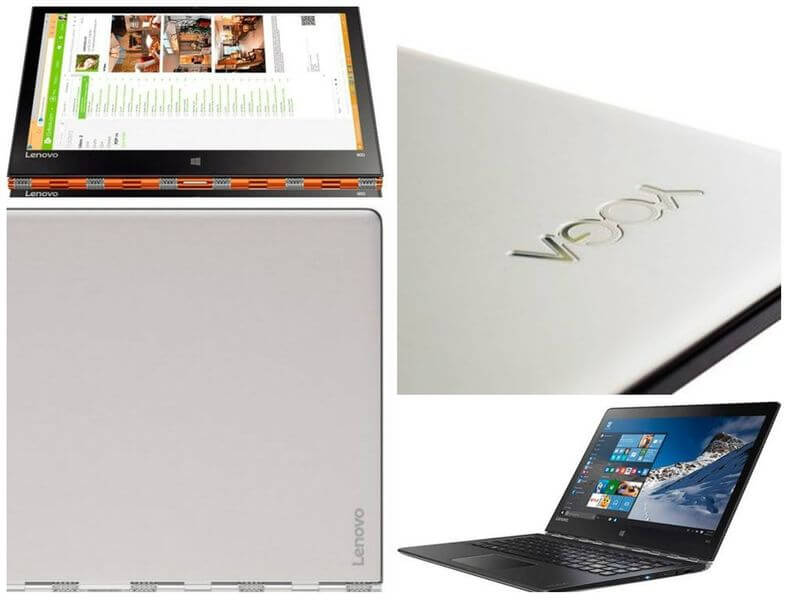
Long time no news that the Transformers line of Yoga allow you to work in one of four modes: a laptop, tablet, console, presentation, and our model is no exception to the rule. At the time, Yoga 3 Pro has surprised its innovative hinge mechanism by which, strictly speaking, such a transformation and becomes possible. Recall that the hinge 813 is composed of the constituent elements and it is made in the form of a bracelet with a large number of stitches. At first glance, it may seem that the change to the hinge mechanism did not happen because apparently it looks the same as its predecessor, but, in fact, the great engineers worked on it. In the new version, it has become even more reliable and disappeared unpleasant creaking sound in the transformation, which many users complained.
Laptop upgrades Lenovo Yoga Transformers 3 Pro
Laptop upgrades Lenovo “dressed” in the metal, and silver casing it even somewhat resembles MacBook. But this impression is deceptive, and it quickly dissipates, it is worth considering more closely the device. Incidentally, the choice of the user is three color options: silver (Platinum Silver), golden (Champagne Gold) and orange variation for the most daring – Clementine Orange.
Appearance laptop upgrades Lenovo seems very thoughtful and well implemented. On its cover, there is nothing superfluous, only the small size of the symbolism of the company, namely the inscription «Yoga» in the upper left corner and the manufacturer’s name in the lower right. Note that the cover withstands the pressure, while it is quite tight, and open it with one hand is not possible. The interior of the display shows the average thickness of the frame, on the top face of which is placed a webcam. The keyboard seems quite a comfortable platform for the hands and performed perfectly because it has a rubberized surface, pleasant to the touch.
With regard to dimensions, they differ slightly from the sizes laptop upgrades Lenovo Yoga Pro 3, and not downwards. Thus, the length is described in this review model is 324 mm, width – 225 mm, the thickness is equal to 15 mm, and weight – 1.3 kg. Recall that the last two predecessor figure is nearly 13 mm and 1.2 kg, respectively.

Display, sound, and webcam: laptop upgrades Lenovo

Perhaps already become a good tradition to endow every laptop upgrades Lenovo line Yoga quality screen. In our case, we have a 13.3-inch display with a fairly high resolution 3200h1800 pixels. Its glossy surface has additional protection in the form of glass Gorilla Glass. IPS panel provides good viewing angles, regardless of the angle.
The screen brightness is not satisfactory; its average is 300 cd / m2. Contrast can be said, not too low – 383: 1, but the black and gray colors of its lack of noticeable. However, should not be upset, because in everyday use the user’s eye is unlikely to catch any problems with contrast, and even more with colors. If we talk about the responsiveness of the sensor, the capacitive screen perfectly responds to touch commands triggered a clear, fast, not even a hint of a suspension.
Laptop upgrades Lenovo Yoga Transformers 3 Pro
Two small stereo speakers are located at the bottom of the JBL gadget, closer to the front edge. The sound can be classified as good, but, of course, to the media it is still very far away. The sound is clearly not enough, and indeed, given their location, the acoustics may seem muted. In any case, for listening to music or movie sound should be enough, but if not – you can always use headphones.
The webcam has a resolution of 1 megapixel modest. With it you can make video calls on Skype, but taking photos is still not a good idea because the detail is very low.

Keyboard and Touchpad: laptop upgrades Lenovo

If you compare the keyboard of the laptop upgrades Lenovo Yoga 3 Pro and Yoga 900, the exterior changes, so to speak, “there is.” The eye catches the fact that the keyboard unit news now has function keys, whereby it became higher. In our view, an additional second row – is the perfect solution because it greatly expands the possibilities of working with the device. For example, it can be used to adjust the brightness and sound level. By the way, the corresponding rocker, which was previous, put to one of the sides faces, disappeared, and it is also an innovation.
The keyboard has two levels of illumination. Its keys are rectangular, not very big, with a rounded bottom portion on which is easily recognizable corporate identity laptop upgrades Lenovo. By the way, when the angle of the transformation of the gadget is more than 190 degrees, the keyboard is automatically disabled to prevent accidental operation. With regard to the characteristics of commonly used buttons, they are, in general, a little bit. For example, [Enter] is a single-row, under it – quite small [Shift], and the turnout unit cannot boast of its outstanding dimensions. By the way, I want to note functionality of the surface: it is made of a rubberized coating, which manifests itself well to use: does not collect dust, dirt, and fingerprints.
Laptop upgrades Lenovo Yoga Transformers 3 Pro
If we talk about the usability of the keyboard, everything is ambiguous, and the views of users who already had time to try it out, proved to be polar. For example, some are dissatisfied with the bad impact and too soft key travel. For others, the opposite turned out to be a short course in the list of advantages of this keyboard, because it allows you to type more words in less time. In general, most likely, the truth is somewhere in the middle, and even if the keyboard at first seem unusual, after a while it will no longer cause negative emotions.
The touchpad has a small footprint. It is smooth, but the fingers to glide comfortably over it and accidental presses do not cause it. The touchpad is extremely sensitive, it has a good response, and there is support for multi-touch gestures. Physical keys do not have that, because of the small size of the manipulator, it is not surprising. But not without a vertical separator, which is a conventional representation of the area left and right buttons.

Performance: laptop upgrades Lenovo

Transformer laptop upgrades Lenovo Yoga 900-13ISK (80MK005NRK) comes with 64-bit Windows operating system 10, which replaces the Windows 8 and is considered to be perfectly adapted for touch control. As the processor uses is a dual-core Intel Core i7-6500U generation Skylake. The operating frequency of the chip varies from 2.5 to 3.1 GHz, moreover, supported nuclei technology Hyper-Threading, which is processed through four parallel data streams too. CPU is made on 14-nm process technology and has 4 MB cache in the third level, plus the whole, it can be called energy efficient because the level TDP of only 15 watts.
A couple of the processor operates graphics Intel HD Graphics with a frequency of 520 to 1050 MHz. It supports DirectX 12 and as for the integrated graphics card is considered to be quite productive. On high settings of the game this year will be almost unplayable, they go with a small number of frames per second, for example, DiRT Rally (2015) with Full HD-resolution on a 12-13 fps. But if you reduce the screen resolution to 1366×768 pixels, and lower the setting to medium, while playing, for example, in Tomb Raider (2013), you can get 37 frames per second.
According to the amount of RAM available two options are 8 or 16 GB of standard LPDDR3-1600 MHz. This configuration provides the maximum possible capacity of 16 GB. The data storage system provided a solid state drive 512 GB, so the lack of space to store information, the user will not feel clear. By the way, there is a version with a smaller volume – 256 GB.

Ports and Communications: laptop upgrades Lenovo

Interfaces to the laptop upgrades Lenovo Yoga 900 remained almost the same as its predecessor. On the right side, you can see the port USB 3.0, 3.5-mm audio, power button, key lock screen orientation, and the reset button / inclusion.
Laptop upgrades Lenovo Yoga Transformers 3 Pro
On the left side – just one USB 3.0, USB 2.0 connector with Power, USB 3.0 Type-C, a card reader 4-in-1 (SD / MMC / SDXC / SDHC).
Front and rear some interfaces available. But wireless communications, in this case, presented Wi-Fi 802.11ac standard and Bluetooth 4.0.

Battery: laptop upgrades Lenovo

The laptop upgrades Lenovo 4-cell non-removable lithium-polymer battery has a capacity of 66 Wh. The device has pleased its autonomy because it is easy to remain on for 14 hours while surfing the Web, the figure dropped to 7 hours and a maximum load – up to 3 hours. Thus, if you do not overdo it, the transformer capacity is enough for a whole day. Of course, if it is expected an active operation, it is better to err and take a charge.

Conclusion: laptop upgrades Lenovo Yoga Transformers 3 Pro

The laptop upgrades Lenovo Yoga 900 is a transformer, which is just beginning to appear on the shelves of our stores. Yoga for additional line needs no introduction, as it already knows every modern user. New made is the best “yoga” tradition: it is able to transform into one of four modes. Thus, may be a tablet or a laptop, and occupy an intermediate position.
For the design of the gadget uses the high-quality material, presentable appearance and practical in life. The 13.3-inch high-resolution display was – 3200h1800 pixels, but its brightness and contrast are not distinguished by high rates. Usability is not affected, but the fact is the case.
Also among the advantages was the filling device that is represented by the latest generation of chip and powerful enough graphics card, which can not only solve everyday problems, and even play some toys. It is noteworthy that the laptop upgrades Lenovo no video output, replacing their port USB 3.0 Type-C with the appropriate adapters.
The only thing that has come under criticism from some users – keyboard, which is the habit, may seem too “soft”, with a short stroke. However, it is a matter of taste and habits. Finally, we note the price of the device, which is on the official website, varies from $ 1,199 to $ 1,399, depending on the capacity of the RAM and the amount of SSD. This price tag is hardly a budget, especially given the variety of similar models in today’s computer market. Especially because many manufacturers produce these gadgets included, for example, with a stylus that certainly will never be over.
Source: device-boom