Showing posts with label Dell. Show all posts

Monday, May 16, 2016

Review of the new tablet Dell Venue 8 Pro: buy and price

Last year, Dell introduced a new tablet Dell Venue 8 Pro, designed for professional use. It can be successfully used employees of large enterprises, employees of medical institutions and other professionals who can not do without a compact Assistant running on Windows 10 operating system.
Tablet Dell Venue 8 Pro is not the first device in the family, back in 2013, we became acquainted with its representatives. Perhaps, the current innovation will attract no less attention than its predecessors. It is Windows 10, “fresh” processor Atom x5, as well as 64 GB of internal memory. Certainly, the tablet will be in demand in the business segment.

DESIGN NEW TABLET DELL VENUE 8 PRO

Let’s start with the fact that the tablet body is not too dimensional, it has dimensions 216h130h9.45 mm. Weighs 377 grams of novelty, that is also a bit for a device with an eight-inch diagonal. Anyway hold it with one hand without problems.Review of the new tablet Dell Venue 8 Pro: buy and price
Dell Venue 8 Pro mostly duplicates of some predecessors, especially when it comes to form. The result is rounded corners, and the panel opposite the display, – a company logo, a camera. By the way, thanks to the textured surface to keep the tablet in his hands is not just convenient, but also somewhat safe because it at the first opportunity does not slip from his hands.
On the display side, all traditionally: the screen itself is directly surrounded by a frame, and the front camera lens. Here, as the back side, virtually imperceptible gap. The only thing hard enough body and is subject to deformation, this, unfortunately, can not be helped.

DISPLAY, SOUND, WEBCAM NEW TABLET DELL VENUE 8 PRO

The tablet is equipped with a compact 8-inch display with a 16:10 aspect ratio. Resolution is normal – 1280×800 pixels, does not compare with the Dell Venue 8 (7840), which has 2560×1600 pixels. However, and this is sufficient for many different tasks. However, it may not always be comfortable in a Windows environment, finger clicking on the program icon.
There is also installed a quality IPS-matrix, through which you can comfortably watch videos or show other pictures, because visibility is excellent regardless of the angle of inclination. On top of the image on the glossy display clear and bright, even in sunny weather picture will have to look closely. As for the touch-sensitive surface, in most cases, it works without any delays, and there is support for 10-finger multi-touch. It is noteworthy that the version of the display resolution in this configuration is not the only one. So, as an option the manufacturer offers Full HD (1920×1200 pixels).
Review of the new tablet Dell Venue 8 Pro: buy and price
The Tablet PC manufacturer Venue 8 Pro installed two cameras. The front has a resolution of 2 megapixels, which means that you are happy to be able to chat with friends or work colleagues, for example, via Skype. In addition, the webcam will make good shots, but in quality they will play the photos, obtained from the main 5 megapixel.
By the way, the last working without flash, but it is not so critical, because the survey can be carried out in daylight and indoors. As for video, the rear camera it shoots in 1920×1080 pixels with 30 frames per second.
Dell Venue 8 Pro only has one speaker, which, however, it sounds loud enough, but with little distortion as it approaches the maximum. Of course, if you like often listen to music without headphones can not do. With them, the sound will be more balanced to compensate for the lack of bass along with high and medium frequencies.

KEYBOARD NEW TABLET DELL VENUE 8 PRO

Data input can be carried out using the Wacom stylus and on-screen keyboard. The latter is easy to get used to, since it’s pretty standard, and the size of the buttons is not so small that it had to be arranged.
As for the digital pen is supplied it is not, so you have to buy separately.

PERFORMANCE NEW TABLET DELL VENUE 8 PRO

Dell Venue 8 Pro (5855) is based on 64-bit pre-installed Windows 10 Pro and is complemented by a number of applications, for example, MS Office Mobile. Moreover, the manufacturer offers a proprietary software and, in particular, Dell Client Command Suite, Dell ProSupport Plus and others.
Review of the new tablet Dell Venue 8 Pro: buy and price
The basis of the filling is a processor Atom x5-Z8500. This chip is built on 14-nm technology, it relates to a quad of SoC, it has a frequency of 1.44 GHz and a cache memory 2 MB Level 2. However, frequency is not always the base, in particular, it can be increased up to 2.24 GHz. Despite the fact that the processor is far from powerful solutions, it is perfectly cope with daily tasks (surfing the web, social networks, office applications and so on.). In addition to the heat, to no more than 4 watts, it will perfectly fit in this 8-inch device.
The system-on-chip includes built-in Intel HD Graphics video card (Cherry Trail). To process the data it has only 12 unified stream, and the maximum frequency reaches 600MHz. However, accelerator supports DirectX 11.2, and thanks to the decoder allows you to play back 4K video. However, the games are not all so rosy here – just go out of date. For example, Diablo III, or GRID: Autosport – at up to 30 frames per second and at low settings.
In addition, the tablet has 2 GB of RAM DDR3L standard, and it is a good amount, which will be enough for today’s tasks, including for games. By the way, the manufacturer offers a configuration with a capacity of 4 GB RAM. For tablets this figure simply superb. But under the storage to 64 GB eMMC reserved. If this volume will seem insufficient, you can always use memory cards of up to 128 GB, for which Dell Venue Pro 8 has a memory card reader.

PORTS AND COMMUNICATIONS NEW TABLET DELL VENUE 8 PRO

Ports in the plate a little bit. If we consider the Dell Venue 8 Pro in the portrait orientation, the bottom can be seen located USB Type-C / Thunderbolt 3 (also used for charging) and speaker.
Windows On the right is the power button, volume rocker, and a card reader microSD / microSDHC / microSDXC and a slot for Micro-SIM under one cap. Last demand in complete set with LTE-module.
At the top is the power button and headphone output.
Review of the new tablet Dell Venue 8 Pro: buy and price
The tablet has a standard wireless communication Wi-Fi 802.11 b / g / n with support for MIMO, Bluetooth 4.0. It is also possible to share content use Miracast, but the support for 3G and 4G available. From sensors present an accelerometer.

BATTERY NEW TABLET DELL VENUE 8 PRO

The new tablet Dell Venue 8 Pro boasts a pretty good autonomy, which provides a non-removable lithium-ion battery with a capacity of one section and a 19.5 Wh. In the test with the playback of streaming video or when reading e-books, it is discharged only after 7-8 hours. Thus, if the device is used for the work in the balanced mode, it is likely to be possible to do during the day and at no extra charge.

CONCLUSION NEW TABLET DELL VENUE 8 PRO

Buying new tablet Dell Venue 8 Pro, you get in the first place, a compact Windows-tablet. Perhaps the obvious advantages here is not much: IPS-screen, modern port USB Type-C, a practical texture on the back side of the case. Everything else is good, but with some reservations. So, stuffing pills to cope with complex under-performing multimedia tasks, but will be mastered by most other modern computing. Autonomy albeit not transcendental, but it is enough to solve critical business issues in the office or on a business trip. The body as a whole practical, however, sometimes bends. Finally, the speakers presented only one speaker, but it gives an acceptable sound.
Of course, due to such things cost about $ 400 to most seem not so attractive at the same time on the «Pro», one way or another, pay attention, because this device is perfect not only for leisure, but for business tasks.
Source: nsmartphone

Friday, October 9, 2015

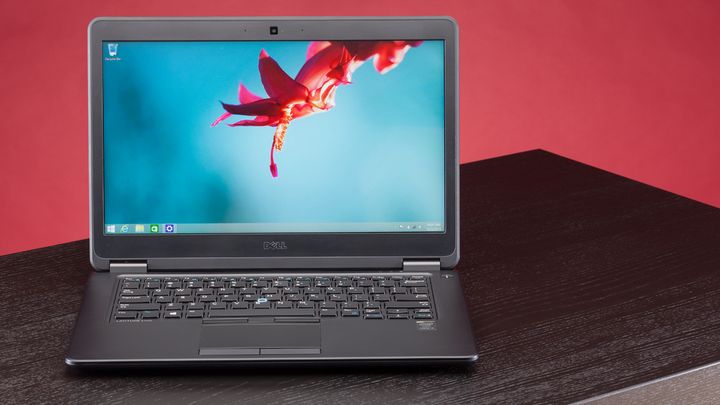
Dell Latitude E7450 Laptop Review

Dell Latitude E7450 – on all sides thought the machine, which is a worthy representative of the business segment. While working on this laptop, you can be sure of performance, body strength, good quality display, and functionality. As colleagues on the shop floor, it has an arsenal of tools to help you in business. Yes, it’s not a cheap office laptop, and the device with the maximum advantages and the minimum disadvantages. Not to be unfounded, consider the Dell Latitude E7450 in more detail.

Design: Dell Latitude E7450

The laptop Dell Latitude E7450 is made of several materials. For example, the outer surface – a magnesium alloy Tri-metal, while the work area – soft-touch plastic. The latter is the best of Mark but at the same time quite pleasant to the touch. Thanks to him, the device practically does not slide in hands. Generally, all of the laptop Dell Latitude E7450 opaque even after prolonged use on them have too many fingerprints. Dell Latitude E7450 opens up to 180 degrees, and the display steadily hold strong and rather massive hinges.
Dell Latitude E7450 Laptop Review
On the bottom panel Dell Latitude E7450, also made of plastic, placed feet, the large air vents, a connector for a docking station. Closer to the front side is in stereo. Access to the internal components on the bottom is not hampered. Quite quickly unscrewed and easy to open. After removing the battery, you can see the memory, storage, etc.
Compiled laptop Dell Latitude E7450 perfectly, and the rigidity of plastic and metal is not satisfactory. No claims and to detail, all of them well-adjusted. It is worth noting the strength of the entire structure, which has been tested for compliance with military standard MIL-STD-810G, although there is a fly in the ointment – the bottom with some effort did get a little bend. But the area of the keyboard more resistant to pressure.
Dimensions of the notebook Dell Latitude E7450 is 337h232h20 mm make it easy to carry it in a bag, and the weight of 1.7 kg is not too heavy if you take the Dell Latitude E7450 daily. As for black coloring, it alludes primarily to work. However, this device is no less elegant and serious.

Display, sound, webcam: Dell Latitude E7450

Laptop screen Dell Latitude E7450 has a diagonal size of 14 inches and a resolution of 1920×1080 pixels (density of 157 ppi). The picture on this display fairly clear, the brightness of 300 cd / m2 and a contrast ratio of 600: 1 is enough to work indoors and outdoors. In addition, it uses a matte finish and IPS-matrix, so it will be comfortable to look at the picture. An optional display is available with touch control or as a budget option – a 14-inch screen with a resolution of 1366×768 pixels.
Dell Latitude E7450 Laptop Review
What really causes misunderstanding, it is a low-resolution web camera 0.9 megapixels. In our time, this is very little, although, of course, problems with video calls will not.
But pleasantly pleased with stereo speakers. They sound surprisingly loud, sometimes even hear the bass, breaks through the high. Overall, the sound is clear, will often go without headphones.

Keyboard and Touchpad: Dell Latitude E7450

Input Devices in this business notebook is sufficient. Provided waterproof keyboard island button layout and the standard layout. Visually, Dell Latitude E7450 review looks more compact than it actually is, nevertheless, most of the normal sized keys except for the hands and the top row of function keys. However, the special inconveniences they do not create. All keys have an average course, their press is accompanied by a small spring loaded. By the way, the keyboard has a two-level backlight for working in the dark is a distinct advantage.
In the center of the keyboard Dell Latitude E7450 is track stick, it is easy to see because He has a blue border. Using the device is simple, as the joystick is perfectly responsive and cursor control is carried out without problems. Track Stick is complemented by three buttons, which are located above the touchpad.
Dell Latitude E7450 Laptop Review
As for the touchpad Dell Latitude E7450, it is located in the center of the palm rest area. Area manipulator optimal to normal position, and the smooth surface of the bit, it does not prevent slip fingers. The touchpad supports scrolling, zooming. Moreover, the multi-touch gestures can be performed not only two or three fingers and four. The touchpad buttons are located at the bottom, work very well.
On-site also has a fingerprint, reader. It is the right of the touch zone. Use it to login recovery record, and only saved fingerprint allows access it.

Performance: Dell Latitude E7450

The device Dell Latitude E7450 7450-8341 is based on the pre-installed operating system, Windows 7 Professional 64-bit version. Among the internal components is provided ULV-processor generation Broadwell Intel Core i5-5200U. The chip has a base clock speed of 2.2 GHz, which with the help of Turbo Boost can increase up to 2.7 GHz. Volume 3 cache level is 3 MB, and the power consumption is less than 15W.
Dell Latitude E7450 Laptop Review
Along with the Core i5-5200U used integrated graphics Intel HD Graphics 5500. This option is ideal if you do not perform very complex graphics tasks and not play demanding toys. HD 5500 has 24 unified stream and supports DirectX 11.2, OpenCL 2.0. In addition, the accelerator is able to decode the N.265, as it can be used to display the image on the three external display at the same time, of course, if you have the required number of connectors. If we talk about the games, at the medium settings will World of Warships 2015 with a frequency of 35 fps. True, it is necessary to reduce the display resolution to 1366×768 pixels. However, it is rather a pleasant exception because Many of the toys even 2014 (Assassin’s Creed Unity, The Crew et al.) will this video card can not do.
Also in the stuffing it provides 8 GB of memory standard, DDR3L-1600 MHz, and SSD mSATA 256 GB. Modern laptop a capacity of RAM is more than enough, the more that RAM can be increased to a maximum of 16 GB. In addition, the download speed, thanks to the SSD will be faster.

Ports and Communications: Dell Latitude E7450

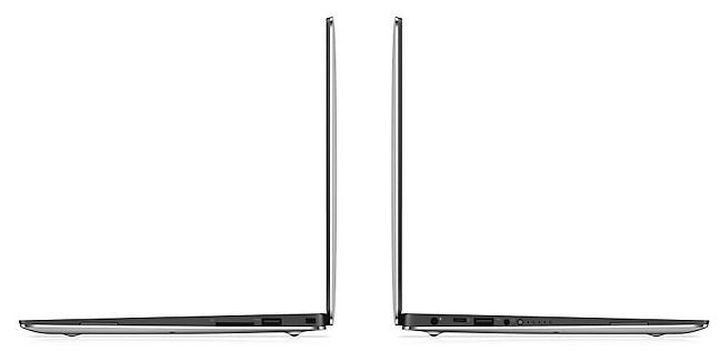
The allocation of ports Dell Latitude E7450 on all sides remained empty, only the front end. On the left edge of the notebook are the SD-card reader and a slot for smart cards. Toward the back panel, you can see a large ventilation grille. The right side is also filled to a minimum. On it you can see the combined audio jack port USB 3.0, as well as a slot for a Kensington lock.
Dell Latitude E7450 Laptop Review
The main part of the interface taken out back. So, there are provided: two USB standard 3.0, HDMI, Gigabit RJ-45 socket for recharging, Mini DisplayPort. Except for the USB, the remaining ports of the rear panel, located really thoughtful. Just behind it will not interfere with the wires connected to the terminals.
By the way, at the bottom of a connector for a docking station for a businessman indispensable interface. By connecting the dock, you can increase the number of ports and connectors.
Dell Latitude E7450 Laptop Review
Among wireless communications laptop, Dell Latitude E7450 has a Wi-Fi 802.11 b / g / n, operating in the 2.4 GHz and 5 GHz bands, as well as Bluetooth 4.0. In addition, there is support for WiDi and Miracast, but no 3G.

Battery: Dell Latitude E7450

Standing in the laptop Dell Latitude E7450 4-cell lithium-polymer battery has a capacity of 54 Wh. With the technology ExpressCharge battery will charge faster, moreover, given the availability of low-voltage processor, it can provide a good autonomy. Thus, in the mode of «Read’s» laptop will last for more than ten hours, and when viewing streaming video or surfing the web over the battery in 7 hours.
Dell Latitude E7450 Laptop Review
Even the maximum load is not able to discharge the Dell Latitude E7450 earlier than 2 hours. In general, with the duration of operation of the device is no problem.

Conclusion: Dell Latitude E7450

Perhaps the only significant obstacle to the purchase of this laptop Dell Latitude E7450 can be the price is $ 1400. That it did not deter the majority of users, briefly remind ourselves of all the pros and cons of the Dell Latitude E7450. So, in this device a reliable body that will stand the daily trips, good autonomy, the number of ports, as well as able-bodied quite filling. In addition, the laptop is equipped with a Full HD-display a wider range of input devices and a pretty good acoustics. There is an essential attribute of a business laptop – the biometric sensor. In fact, I would like to see in the Dell Latitude E7450 web camera with higher resolution and more rigid bottom. You can buy Dell Latitude E7450 on the official site. And so, for a business device more than a good laptop, so you can shell out and not spare even such a sum of money.
Source: device-boom

Wednesday, October 7, 2015

XPS 13 9350 – and thin laptop from Dell

Dell continues to enhance its line of laptop computers. There are reports that in November will release the light and thin laptop XPS 13 9350.
The 13.3-inch laptop model is created based on the platform Intel Skylake and operating system Windows 10. Product specifications, the complete configuration is impressive.

Feature of the new light and thin laptop Dell XPS 13 9350

XPS 13 9350 - light and thin laptop from Dell
As an example, the top-end configuration has 16 GB of RAM, as well as the storage capacity of 1 TB. Plus 2-core processor Core i7-6500U with a maximum clock frequency of 3.1 GHz.
XPS 13 9350 - light and thin laptop from Dell
Interestingly, a choice of two screen touchscreen with a resolution of 3200 by 1800 pixels and a conventional Full HD (without control over your fingers). Responsible for processing graphics accelerator built-in Intel HD Graphics 520.
XPS 13 9350 - light and thin laptop from Dell
Another device is equipped with a connector USB Type-C interface that supports Thunderbolt 3. Among other things, the presence of 2 standard connector USB 3.0, card slot for SD, Wi-Fi 802.11ac, the battery capacity of 56 watt-hours, and Bluetooth 4.1.
XPS 13 9350 - light and thin laptop from Dell
The price of the light and thin laptop – from 1139 euros. And you can buy Dell XPS 13 9350 in the USA for $799.
Source: device-boom

Tuesday, October 6, 2015

Dell Inspiron 5758 Review

Despite the fact that today in vogue thinner and lighter notebook, many still remain faithful to the classics. That is why the segment of home laptops will always be in demand, and hence, he always will be updated the new model. This time, under our eye, turned out the 17.3-inch device that is ideal for solving the problems average.
Dell Inspiron 5758 is endowed with a good enough screen resolution of HD +, stuffing, which includes chip generation Broadwell, discrete graphics, and a capacious hard drive. In short, this notebook has all the makings to become a reliable assistant to any user.

Design: Dell Inspiron 5758

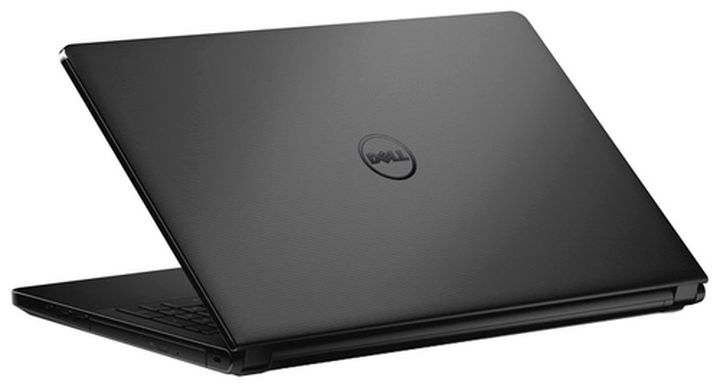
As befits the home laptop Dell Inspiron 5758, the appearance of Dell Inspiron 5758 is designed in a calm, discreet colors: we have chosen equipment is completely black, but there are other modifications, in particular, with a gray cap. As the plastic material is only used, and, in general, a positive impression of the design does not spoil it. The lid has a textured surface, pleasant to the touch, non-staining and practical. In the center panel, the manufacturer put a chrome logo more there is nothing. The lid flexes, and quite strongly, so it is once again not to push it.

Dell Inspiron 5758 Review
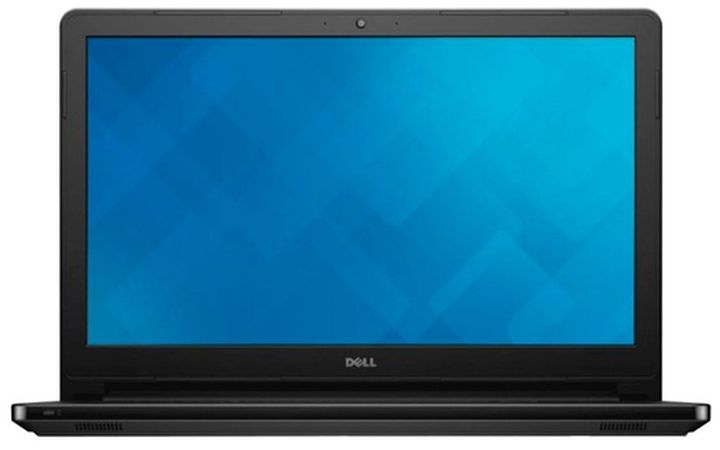
The glossy display Dell Inspiron 5758 surrounds the frame is not too thick, on top of that – eye cameras, and at the bottom – a small brand logo. The hinge that connects the upper part with the lower tight enough, and if you try to lift the lid with one hand, it inevitably drags along the entire body.
The bottom of the notebook Dell Inspiron 5758 is made by analogy with the cover, that is, it is also plastic, black. To the laptop was stable on any surface on the bottom panel has two legs at the bottom and at the top – a long rubber insert. By the way, it is possible to upgrade a laptop, which will have to unscrew the two screws. As a result of these actions, the user is able to get to the battery, hard drive, and RAM.
Laptop Dell Inspiron 5758 is easy to use. Despite the fact that its weight reaches almost 3 kg (2.8 kg, to be precise), the process operation does not cause any discomfort. Yes, portability is not the forte of this laptop, but then it is not about Ultrabooks, but the home device. As for its dimensions, the humble they also will not name (416h283h27 mm), but, again, for a device that is not likely to leave the room, they do not play a big role.

Display, sound, and webcam: Dell Inspiron 5758

The screen of this laptop is not his forte. Dell Inspiron 5758 features a 17.3-inch display, whose resolution is 1600×900 pixels, and the density of pixels per inch is equal to 106 ppi. TN + Film matrix can not talk about the ideal wide viewing angles, however, nothing particularly bad about it, too, can not say.
Dell Inspiron 5758 Review
The maximum brightness is less than 200 cd / m2, the display surface gloss. By the way, when working with a laptop Dell Inspiron 5758 to direct sunlight should be avoided so as not to aggravate the situation highlights. In general, the display of the laptop has all the disadvantages that are commonly found in low-cost devices. Thus, the output of the black color is not enough rich, more like gray, the contrast is rather weak, the backlight – is uneven.
Dell Inspiron 5758 Review
Two speakers are located on the front bevel laptop Dell Inspiron 5758. They sound pretty good, compared to laptops, designed exclusively for use in the home. The sound is loud, but at the maximum possible wheezing, especially at low frequencies. As usual, headphones save the situation and allow you to enjoy the sound of your favorite songs or movies at a higher level. The web camera has a native resolution – 0.3 megapixels. With it you can make video calls, for example, on Skype. Theoretically, the camera can take photos, but about what they are quality, easy to guess.

Keyboard and Touchpad: Dell Inspiron 5758

In a notebook Dell Inspiron 5758, aimed at home use, I like to see a comfortable keyboard, because users often do a lot of typing. Unfortunately, Dell Inspiron 5758 will disappoint many people, at least in the early stages of a laptop keyboard may not seem very comfortable. On the one hand, it is made from a rubberized plastic, very pleasant to touch. However, on such a surface dust lingers willingly, but because it is necessary to always monitor the cleanliness of the keyboard unit.
Dell Inspiron 5758 Review
In general, despite the fact that we are dealing with a 17-inch form factor, the keyboard seems too compact. It is a full-size, island-style, has a small square-shaped button. There is a digital unit, but the backlit keyboard cheated, at least, in the described configuration is not. All keys have the usual form, unremarkable and did not stand out against the competition: [Enter] – Single row, both [Shift] have an elongated shape, but the [Ctrl] – too small. The small size and the switch block, but it is common practice that has long taken root, and no one is clear.
The keys have a middle course, someone he can even seem unimpressive. In addition, when you click it loud enough. In the upper right corner above the keyboard has a button on the device. It is a small, neat circular shape. The keys are slightly recessed inside, so find it even in the dark is not difficult.
Dell Inspiron 5758 Review
But to the touchpad I have absolutely no complaints, quite the contrary! It turned out great, with a smooth surface. It is impossible not to note the high sensitivity of the arm, because all the commands given to his participation, carried out quickly and efficiently. The touchpad supports many multi-touch gestures. By the way, there are no dedicated physical buttons are integrated into the surface of the touchpad. Visually identify the location of the mouse buttons is possible by means of the vertical separator located in the middle.

Performance: Dell Inspiron 5758

Dell Inspiron 5758 -6712 operates on 64-bit operating system Windows 8.1. About the performance of any device can talk, based on the capabilities of his filling. So, in this gadget provides a dual-core chip Intel Core i5-5200U architecture Broadwell. It’s base frequency is 2.2 GHz, but it can be increased up to 2.7 GHz. The processor is configured for 14-nm process technology, it supports DirectX 11.2, OpenCL 2.0, OpenGL 4.3. Supports multi-threading technology Hyper-Threading. CPU has 3MB cache level 3, and also boasts a relatively low energy consumption – up to 15 watts.
Dell Inspiron 5758 Review
Graphic shows two graphics cards: the built-in Intel HD Graphics 5500 and a discrete NVIDIA GeForce 920M with 2 GB of internal memory standard, DDR3. The first is useful for running simple applications, whereas a discrete video card is designed to solve the much more serious problem. GPU is built on norms of 28-nm architecture Kepler, it has a frequency of 575 MHz, which can be increased to 954 MHz. With games this graph to the right, but not all. For 2014-2015, toys. often go on lower settings. For example, the simulator Sims 4 (2014) and Tomb Raider (2013) run on the medium with the display resolution of 1366×768 pixels with a frequency of 67-70 fps and 42-43 fps, respectively. But Batman: Arkham Knight (2015) with the same settings will be almost unplayable (13 fps).
The notebook Dell Inspiron 5758 sufficient amount of RAM – 8 GB DDR3-1600 MHz standard, which is in this configuration the maximum possible amount. To store the information provided hard disk capacity of 1 TB and a spindle speed of 5400 rpm. In general, the standard figure for modern laptops similar orientation.

Ports and Communications: Dell Inspiron 5758

Let’s see how Dell Inspiron 5758 things with interfaces. The right side of the gadget has two ports USB 2.0, optical drive DWD-RW, a combined audio jack and a slot for a Kensington lock.
The left side offers to use another USB port Standard 3.0, video output HDMI, network RJ-45 connector and card reader SD. Here – socket to recharge and ventilation grille.
Dell Inspiron 5758 Review
Neither the front nor behind interfaces not. With regard to wireless communications, they are presented with the module Wi-Fi 802.11 ac / b / g / n and Bluetooth 4.0.

Battery: Dell Inspiron 5758

The Notebook Dell Inspiron 5758 is equipped with the 4-cell lithium-ion battery capacity of 40 Wh. By and large, the capacity of the battery is not the factor that plays an important role when buying a laptop Dell Inspiron 5758 for home use. It is designed primarily to the fact that there will always be next to the socket, which can be used at any time. However, to meet with a margin of autonomy of the device is not to be superfluous. So surfing the web with the included Wi-Fi “plant” a gadget for about 5 hours. Read mode will drain the battery a little less than 8 hours, and a maximum load of the laptop turned off after a couple of hours. Overall, the results are quite good and quite expected.

Conclusion: Dell Inspiron 5758

Without a doubt, Dell Inspiron 5758 laptop will interest many users. First of all, because it is multi-functional and not a narrow focus, moreover, it is ideal for use in homes and offices.
Dell Inspiron 5758 Review
The model dressed in a stylish plastic case. The manufacturer has given its 17-inch screen with aresolution of HD +. Inside the Dell Inspiron 5758 installed processor 5th generation, as well as the entry-level discrete graphics card. With it will play in some toys, but not the most advanced. In addition, the device shows excellent battery autonomy, and this fact can not but rejoice. You can buy Dell Inspiron 5758 for $ 449.99. Well, the price tag of $ 700 allows you to talk about competitiveness in the global notebook market.
Source: device-boom

Sunday, October 4, 2015

Dell is developing a tablet XPS 12 (9250) with 4K display

The US, Dell is developing a tablet XPS 12 (9250), which has a number of interesting features. Perhaps the most important of them – 12.5-inch IGZO-display with a resolution of 4K and supports pen Dell Active, designed for drawing and handwriting. (However, inexpensive modification of this “tablet” still receive Full HD-screen.)

Feature of the new tablet XPS 12 from Dell

Dell is developing a tablet XPS 12 (9250) with 4K display
The basis for tablet XPS 12 (9250) will be the processors Intel Core M (Skylake). It is known that the tablet will get SSD-drive M.2 SATA, Wi-Fi modules and Bluetooth, two-port USB Type-C with support for high-speed Thunderbolt interface 3, SD-card slot, as well as cameras with a resolution of 5-megapixels and 8megapixels. Some modification of the device will be equipped with a modem, network support LTE.
Dell is developing a tablet XPS 12 (9250) with 4K display
For the Dell XPS 12 (9250) will offer two versions of keyboards. First – Ultra-thin: the thickness does not exceed 13 mm. The second less elegant, but more functional – with backlit keys, the touchpad with a glass cover and a set of connectors (USB Type-C, USB 3.0, HDMI).
The weight of the tablet XPS 12 will be about 790 grams.
Dell is developing a tablet XPS 12 (9250) with 4K display
Information about price and timing of the XPS 12 (9250) on the market yet.