Showing posts with label tablet. Show all posts

Saturday, May 14, 2016

Acer Iconia Talk 7 Review – Tablet with charisma

In this review we will focus on the representative of the company Acer – tablet Acer Iconia Talk 7. His performance he never will win, and the rest of the specifications is not to say that the ultimate dream. And yet, this device catches sight because it looks like an extremely stylish and stands out among peers, state employees. Well met, as we know, by their looks, and only after that to get acquainted with the contents.
The tablet is for many users in the same integral part of the image, like, say, a smartphone. Tablet PCs come in different sizes, so the user has the choice of how it should be the mobile tablet. Of course, in addition to the screen diagonal, there are other selection criteria, such as the materials used, the weight, a variety of wireless modules, etc.

DESIGN ACER ICONIA TALK 7

For this tablet used plastic, which is quite logical, considering the price tag of the device. Manufacturer departed from the conventions, and the device did not black or white, and gold. This color does not occur very often, and most are already tired of the same type of boring colors, because this decision may be interpreted in the “hurray”, regardless of gender. Further – more matte cover Acer Iconia Talk 7 is not smooth and rippled: set of points as if pressed into the surface, and it looks, frankly, very stylish. By the way, she Acer claims that the Italian designers were invited to develop such a design. Finally, in the middle of the lid there is a large brand logo, and at the top – a large rear camera lens.Acer Iconia Talk 7 Review - Tablet with charisma
The front of the tablet – the antithesis of the back. The frame is made in a white color, in addition, it is glossy. Whatever it was, the display collects fingerprints (as well as any other mobile device). Under the screen – another logo, this time-saving, above it – the earpiece and front a webcam.
The housing is also fairly easily soiled, it instantly left fingerprints, and visible fine scratches and dust. Rounded corners visually reduce the actual size of the tablet, making it seem very tiny. In fact, the dimensions Iconia Talk 7 – 190h108h10 mm. This tablet PC is very lightweight – only 280 g, respectively, it makes sense to speak of its ergonomics. Besides, he does not slip, comfortable to hold with one hand, so for those who do, say, some notes on the go, this device – a godsend! The only thing that upsets – the build quality. If the pressure on the body, he treacherously zaskrepit. Given this unfortunate fact advise all the same to get a protective cover, so that the device has not ceased to please you ahead of time.

DISPLAY, AUDIO AND WEBCAM ACER ICONIA TALK 7

Technical characteristics of the tablet screen modestly: resolution is 1024×600 pixels, pixel density per inch – 160 ppi. Undoubtedly, those who will compare with the more advanced models with a resolution of the display, at least, Full HD, will suffer a huge disappointment. But if you do not expect from devaysa nothing supernatural, and the sobering reality will not happen, because, in fact, for a 7-inch diagonal figures are quite normal. Additionally pleases decent color reproduction, as well as a good level of brightness and contrast.
The display is implemented TFT IPS-matrix, through which the image does not fade under any angle. There is support for multi-touch gestures, but the number of simultaneous keystrokes minimum – no more than 5. there is a light sensor above the screen, but it does not always works correctly. Incidentally, the display surface is very sensitive to depression, so it is usually commands are executed without delay. By the way, the tablet has a function MiraVision, with which you can “play” with the settings of the image by adjusting the brightness, sharpness, saturation, contrast, etc.
Acer Iconia Talk 7 Review - Tablet with charisma
Loudspeaker in only one plate, and it is located in the lower part of the cover unit. You do not expect miracles from him? And rightly so, we should not entertain hopes, because in this case they are not met. The sound output is not very loud, for a small room – just right. However, you can always use the headset, and then the acoustic data will improve significantly.
Web cameras, as we have already mentioned, two. Front received permission 2 Mp, for good quality images it is not happy. Optimally to use the front webcam for video, in which case it will prove best. With regard to the rear of the module, its resolution is higher – 5 megapixels. There is no flash, autofocus is activated intermittently, so rely on it too much not worth it. In the daytime, you can make quite decent photos, but with the onset of dusk and night shots granularity falls significantly.

KEYBOARD ACER ICONIA TALK 7

Of course, neither of which docking keyboard is not talking, but it makes sense to mention the virtual. It is standard for the Android operating system, and we are confident that the vast majority of users have been dealing with it through other mobile devices. Keyboard interface is very simple: small buttons, the ability to change the language, keyboard layout, appearance. In addition, there are fonts of the Acer brand, it will be interesting to many.
At the bottom of the screen, one can see three small touch-sensitive buttons, “Home”, “Menu” and “Back”.

PERFORMANCE ACER ICONIA TALK 7

The Acer Iconia Talk B1-723 7 operating system Android 5.1 Lollipop. It shall be accompanied ton of system applications, such as utility “System Doctor”, operating on a similar principle with CCleaner. In addition, it was not without firm Acer’s application suite for working with photos, music and documents. Finally a few words about branded utilities: EZ Note allows you to make notes, EZ Snap – take screenshots.
Acer Iconia Talk 7 Review - Tablet with charisma
Now just about the hardware. In the role of advocates MediaTek MT8321 SoC with 4-core ARM Cortex-A7, which operates at a frequency of 1.3 GHz. In conjunction, with the schedule, it is ARM Mali-400 MP, which supports OpenGL ES 1.1 / 2.0. Hardware components are not the most productive and, frankly, in the direction of 3D-games better and not an eye, in the case of this tablet would have to confine unpretentious 2D-toys.
The amount of RAM is only 1GB (available will be around 900 MB) DDR3 standard, which by today’s standards is already very small. This is another argument “against” run most games since even many undemanding shooters because of the small amount of RAM will lag. For data storage provides 16 GB, of which the user will fall to slightly less than 12 GB, and the rest will be given under the system. Components with higher capacity flash drive manufacturer, unfortunately, is not provided.

PORTS AND COMMUNICATIONS ACER ICONIA TALK 7

With interfaces from Acer Iconia Talk 7 the situation is as follows: The right side has the volume adjustment rocker and physical power button device. A little further – the plug snaps, by the way, is very short-lived at first glance. Beneath it hides as much as two compartments for SIM-cards and a slot for microSD / microSDHC card reader to 32GB.
There is nothing left, but on the upper side has a Micro-USB port and headphone output.
Below – a microphone. With the wireless communications business in tablet things just fine, because, in addition to standard Wi-Fi 802.11 b / g / n and Bluetooth 4.0, there is also a 3G module, not to mention the GPS and GLONASS navigation. With 3G without problems, switching between the “SIM cards” setting is carried out OSes.

BATTERY ACER ICONIA TALK 7

1-well non-removable lithium-polymer battery of the tablet Acer Iconia Talk 7 has a capacity of 3380 mAh. The capacity of the battery will last approximately 9 hours of web surfing, and idle equipment and all can spend the whole day. Video playback defuses the device for about 3.5-4 hours, and the maximum load (for example, games) – 2 hours, or even faster. That is to say, the outstanding autonomy Tablet PC can not boast, so with the active exploitation of its still better to keep the socket in the field of vision.
Acer Iconia Talk 7 Review - Tablet with charisma
A few words about the body heat. Many low-cost mobile devices are heated, and quite significantly, so that’s Iconia Talk 7 – a pleasant exception. The body does not get hot even when running demanding tasks, and this will agree, it is worth a lot, considering that the 7-inch tablet users almost do not let out of the hands.

CONCLUSION ACER ICONIA TALK 7

We must admit that at first, we were unsure if the tablet Acer Iconia Talk 7 – typical state employees, with a similar segment of the same type inherent disadvantages and problems. And even surprise us that the baby was not possible, however, to please some moments he definitely succeeded. Main, on that bet manufacturer, – the appearance of the tablet. Housing although plastic, but it is the embodiment of ideas neizbity: corrugated cover, with sunken points, which form a kind of geometric plexus. Sure, thanks to this design, the device will stand out from cheap analogs.
As for the other characteristics, the experienced user, they will not be surprised: a 7-inch screen with a low resolution of 1024×600 pixels, one speaker, low power stuffing, which is designed to perform daily tasks. In particular, the device is perfect for web browsing, watching videos or photos, create notes, that is, a basic set of functions for every day.
However, Iconia Talk 7 is able to cope not only with their direct “duties” because it is used in parallel for calls! The device has two slots for SIM cards that are easy to switch between them. In short, Acer Iconia Talk 7 – tablet, which has something of interest to the buyer, and, fortunately, not only in appearance but also quite loyal to the price tag of $ 120.
Source: nsmartphone

Wednesday, May 4, 2016

Delivery of 2-in-1 hybrid tablet is still very good, despite the bad trends

If you regularly follow our portal, then you know that the tablet market is in trouble, sales fall. However, not all models. It is very well run by the so-called hybrid tablet 2-in-1 devices, especially some manufacturers.
The logic is simple. The inflated balloon is deflated – after the emergence of the tablet was a real “boom”, the story came back to where it belongs. The device without the keyboard anyway we work incomplete. True, good entertainment, movies, music, surfing, or any serious attempt to work falls into the water without a keyboard. It is precise because the world of tablets and laptops are increasingly intertwined.

THE NEW HYBRID TABLET 2-IN-1 SPECS AND FEATURES

Delivery of 2-in-1 hybrid tablet is still very good, despite the bad trends
A kind of proof is the 2-in-1 hybrid tablet, a sort of mixed race between laptops and tablets, which have characteristics of both categories – touch screen and the keyboard. If you look at IDC figures supplied HP tablets in the first quarter of this year (data from 28 April 2016) then we see all of this as we just said, “hold water”.
In Q1 2016 the total hybrid tablet shipments worldwide amounted to 39.6 million, which is 14.7% less compared to the same period last year, when it shipped 46.4 million tablets. Still most of them selling Apple, which holds a quarter of the world market, while the other is Samsung. Amazon.com jumped to third place, and the top five were Lenovo and Huawei.
Source: nsmartphone

Sunday, October 11, 2015

The cheapest Android tablet

In this guide, we look at the cheapest Android tablet, available for purchase in American today, halfway through 2015. There are many options when it comes to the budget tablets on Android, many of them fall into the category of cheap, and most of them are characterized by small the size. The term “cheapest Android tablet” may be different for everyone, so in our collection, we confine ourselves to 180$.
Choosing among the variety of cheapest Android tablet can be a challenge, so we’re going to relieve you of the problem and suggest the cheapest tablets on June 2015. We want to help our readers and potential customers to choose the best tablet that will be friendly to the wallet, but it will not be cheap piece of junk, we have compiled a list of the best and cheapest Android tablet, available today.
Not everyone can afford the latest Samsung Galaxy Tab SNexus 9 and iPad Mini, whose price tags playfully rolled over 400$, as a result we have received many questions about the wallet-friendly tablets to Android. Below are some of the best options are still good enough for the hard-earned money.
The cheapest Android tablet
Almost every manufacturer can release a tablet on Android, which means that there are many different options and, no doubt, terrible tablet on the market. As a result, we have high quality and expensive tablets like the Nexus 9 and Galaxy Tab S, as well as some awful Chinese fakes and tablets Acer, the cheapest of which are not worth the money.
The cheapest Android tablet are not for everyone, but if you are a user who is looking for a budget tablet, or simply do not want to spend a lot of money, as well as casual viewing of web pages, streaming Netflix, YouTube, and HD gaming, we have some good ideas. Do not buy cheap Chinese tablets, do not look well plates with minimum hardware specifications. Plates from our list promise you a quality user experience and you can enjoy them. This is the cheapest tablet market as well as the very best in value for money.
You should not rely on 1080p (or higher) resolution display, 4G LTE connection, and 8-core processors, but the majority of tablet runs on the latest version of Android, and are able to cope with everyday tasks. Let’s start.
It should also be noted that it is only five of the many excellent cheap tablets on Android. There is a huge choice in affordable price range, which is only slightly higher than our limit submitted tablet Lenovo,AmazonDellAcer, and even Google Nexus 9. You’ll find most of them in our sample the best budget tablet 2015, a link to which you will find above.

#1. The cheapest Android tablet: Google Nexus 7 (2013)

And although he is beginning to show its age, the second generation of the Nexus 7 tablet, released in 2013, is still the cheapest and, honestly, the best budget tablet market. Of course, the new Nexus 9 better, but it’s too expensive to get into our list.
Google Nexus 7 (2013) still offers everything that makes considerably more expensive competitors, but much cheaper. You will enjoy the latest Android 5.1.1 Lollipop and become one of the first to receive the newly announced Android M at the end of this year.
The cheapest Android tablet
The new Google Nexus 7 (2013), entered the market with a price tag of about $ 229 and beyond the scope of our list. However, today, the tablet will cost you $ 165. For the Nexus 7 16GB, and the slightly more expensive option of 32 GB. During these 145$ you get a 7-inch Full HD display with a resolution of 1920 x 1080 pixels, quad-core Snapdragon processor and 2 GB of RAM, 16 GB of internal memory and comprehensively the best tablet on the list.
Google is not the Nexus 7 sells in its stores, replacing its road version of the Google Nexus 9, but in the local stores you will still find new Nexus 7 does not mention the fact that he is still sold directly by the manufacturer, ASUS.

#2. The cheapest Android tablet: Dell Venue 8

While Dell offers a great new cheapest Android tablet Venue 8 (7000), that is too expensive for our list. Instead, we offer senior and cheap Dell Venue 8, which you can find a cheaper $ 119 for the 16GB model.
The cheapest Android tablet
The cheapest Android tablet comes with an 8-inch Full HD-panel (1920 x 1200 pixels), Android 4.4 KitKat (soon Android 5.0), with an Intel 2.1 GHz and 2 GB of RAM. Add to that a 5-megapixel rear and 2-megapixel front camera and a slot MicroSD. Perhaps it is not the best tablet on the market, but at 110$ a good, cheap tablet.

#3. The cheapest Android tablet: Samsung Galaxy Tab 8.4 Pro

Since the last tablet lineup, Galaxy Tab S are too expensive for our list, the next best deal from Samsung, this 8.4-inch Samsung Galaxy Tab 8.4 Pro. This tablet is a bit older than 4 new Galaxy Tab and Galaxy Tab A, but it is the cheapest tablet in the model range of Samsung, which creates a very positive impression.
The cheapest Android tablet
More recently, it has fallen to a price tag of $ 199 and among the cheapest Android tablet in this list, he is probably the best. Samsung Galaxy Tab 8.4 Pro comes with an 8.4-inch Quad-HD display, powerful 4-core processor and 2 GB of RAM, 8-megapixel rear camera, and 2-megapixel front camera. 16 GB of internal memory, MicroSD slot and a recent update Android 5.0 Lollipop designed to sweeten the pill.
Perhaps, Samsung Galaxy Tab 8.4 Pro is starting to show its age, but with a price tag of 180$ instead of 290$, that’s a great tablet that fits perfectly into our list.

#4. The cheapest Android tablet: Lenovo Tab 2 A10

The cheapest Android tablet Lenovo Tab 2 is a relatively new tablet in 2015, as well as a large tablet, because its diagonal is 10 inches, despite the fact that it fits into our price ceiling. Not everyone wants to have a 7-inch tablet, but Lenovo Tab 2 A10, probably the cheapest tablet with a diagonal of 10 inches.
The cheapest Android tablet
Lenovo Tab 2 A10 comes with 10-inch Full HD IPS-display with a resolution of 1920 x 1200 pixels, the 4-core processor with 2 GB RAM, 16 GB of internal memory and a slot for MicroSD, tablet runs on Android 4.4 KitKat. It offers users several speakers for better sound, along with the 8-megapixel camera and a front camera of 5 megapixels. The plate goes on the market in several colors. This is another budget tablet at a reasonable price.

#5. The cheapest Android tablet: LG G Pad 10.1

Since the first few cheapest Android tablet were smaller, the last two have a much larger size, still remains relatively cheap. Here we look at 10-inch LG G Pad 10.1, worth about 180$.
The cheapest Android tablet
In the cheapest Android tablet market came with a price tag of 220$, that does not fit in our list, but the G Pad 10.1 comes with a good set of hardware. LG G Pad 10.1 offers HD-panel with a resolution of 1280 x 720 pixels, which is the weakest side of the tablet. The rest of the merits of the tablet include Android 5.0 Lollipop, 4-core Qualcomm Snapdragon with 1 GB of RAM, 16 GB of internal memory and a slot MicroSD. You also get a 5-megapixel rear camera and 1.3-megapixel front camera.
It is a worthy representative of the list of the cheapest Android tablet, which promises 8 hours of battery life, offers a powerful processor, and is great for gaming and watching videos.
Source: device-boom

Sunday, October 4, 2015

ASUS ZenPad S 8.0 Review: The First Tablet with 4GB of RAM

ASUS ZenPad S 8.0 – the world’s first tablet with 4GB of RAM. The second will be the Apple iPad Pro, but the huge tablet Apple is not a competitor of a compact 8-inch model ASUS. And then finish metal body under the skin and is the new processor Intel. Powerful new.

Fashionistas will appreciate

The sleek bar design – decoration, reminiscent in appearance to the skin. But if the touch surface, it can be concluded that it is a rubberized material. For it is convenient to grasp the tablet that resembles a woman’s clutch. Association continues to corporate cover-stand, decorated in the same style. It helps set the gadget to your desktop, so it will be easier to watch movies or read. Not just an attribute of a beautiful life.
ASUS ZenPad S 8.0 Review : The First Tablet with 4GB of RAM
The unit decided to make a fashion accessory, as you approach this? We like it all already tired of repetitive clones, nice to meet new idea.
The tablet with 4GB of RAM is very light, it is convenient to take in hand and read a book during a trip on the subway. It weighs less than 300 grams and the thickness of only 6.6 mm. Build quality is excellent, the tablet or bends or breaks force. However, hardly anyone would sit with him in the back pocket of jeans, it’s not a smartphone. Angles maximum smoothed sides and ends, too, with no sharp lines. Ergonomics is well thought out, the device can be controlled with one hand, and the two, depending on the task.
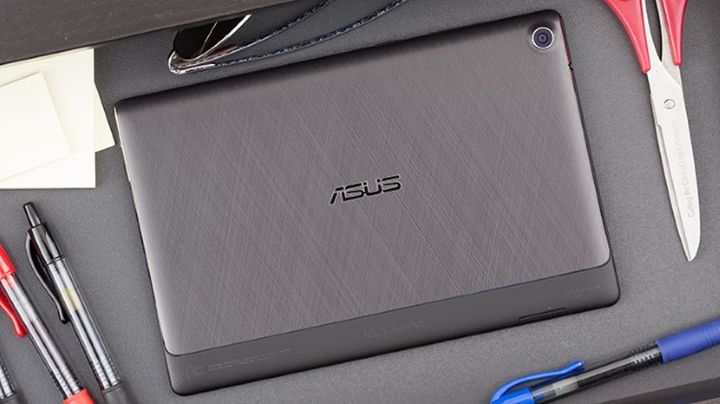
Almost the entire rear of the closed metal plate, decorated with a pattern in the style of large tablets or laptops ASUS. The fascia speakers are sent directly to the user when he holds in front of the plate.
The sound is loud, but there is no bass at all, then do not listen to dubstep.

The most powerful  tablet with 4GB of RAM

The heart of the tablet with 4GB of RAM ASUS ZenPad S 8.0 – its processor Intel Z3580 with 2.3 GHz and 4 GB of RAM. 16 GB of internal memory, due to the additional slots can be installed even 128GB. “Stuffing” is similar to that in the smartphone ASUS Zenfone 2, it is not surprising that in the benchmark model beats out very good results.
ASUS ZenPad S 8.0 Review : The First Tablet with 4GB of RAM
This power allows you to play any games on the highest graphics settings, gamers will like it.
And why not make a thicker body, his here more capacious battery? But functionality is sacrificed design. It’s a pity. During the game heats the upper part of the plate, but still you can play, there is no discomfort. However, the brightness of the screen may be “blown away” from 100% to 50%, automation works strangely.
The tablet with 4GB of RAM is designed for entertainment, so let’s see how it works in different modes. Games will put the battery for 3.5-4 hours, and watching videos in Full HD at maximum brightness – 6 with no more. Not to say that it is very little, but not very much, the average results by the standards of the class. Comparable to the Xperia Z3 Tablet Compact. But if you buy a tablet with 4GB of RAM for watching videos, then choose the best Samsung Galaxy Tab S 8.4, it works longer in this mode. The same can be said about the iPad mini 2 or 3.
ASUS ZenPad S 8.0 Review : The First Tablet with 4GB of RAM
The main body of two connectors: a port for a microSD USB type-C. So going on a trip, do not forget to bring your cable, otherwise there will be problems finding suitable. For aesthetes, the real blow will shift to the right USB-port. The data can be transmitted wirelessly by Bluetooth 4.1 and Wi-Fi 802.11ac.

A clear picture

Frames have a large tablet with 4GB of RAM, but otherwise I would have problems with the management: no place to stretch your fingers, there are false positives. This could be avoided with the little aesthetic loss. Display 8-inch diagonal and a resolution of 2048×1536 pixels. Dot density is comparable to the iPad mini, where the retina screen, or compact tablet Samsung. Display good oleophobic coating, then remove fingerprints easy 10-point sensor is working properly.
ZenUI looks not in the spirit of the canons of material design. Although the shell is decorated in minimalist style, it works quickly and smoothly. So if you do not find fault with the clearance of other observations to her there. The tablet provides a convenient feature. With the installation of new software applications themselves are sent to a specific folder.
ASUS ZenPad S 8.0 Review : The First Tablet with 4GB of RAM
Put the race, the application goes to the games section, bought a new video player, he gets in a section of media. And so on. Unusual and convenient option.
It is practical because it allows you not to waste time on manual sorting applications in the menu. However, if you do not like the automation, this option can not enjoy.

Quite simple camera

Cameras here without frills. The 5-megapixel module is suitable for self in the street, and the main 8-megapixel sensor will make a copy of a document or a photo of acceptable quality. But it is advisable to take something static, because with children running around shooting autofocus can not cope.
Even a day in the pictures a lot of noises, not to mention the subjects are taken at night or indoors.
ASUS ZenPad S 8.0 Review : The First Tablet with 4GB of RAM
The package included accessory feather Z Stylus. It helps to take handwritten notes, draw, control tablet. If you wish, you can enter text stroke or cut the desired areas. The slim space for the stylus is not found, so it can be mounted on the cover. Def need to buy separately.
The most important features of ASUS ZenPad S 8.0 – a powerful platform Intel, the just tablet with 4GB of RAM (more is no one) and a beautiful body. Metal, clearance under the skin, design accessories – tablet looks stylish. Praised the model of a high-quality screen, thin and lightweight design, good thickness at this time of the performance. Quarreled over the lack of support for LTE: calls, receive SMS tablet can not. The quality of the speakers is also not very high, we expected more.

Verdict

The price ASUS ZenPad S 8.0 is 390 US. The main competitor – iPad mini 3 version of 16 GB of memory costs about 360 US, but the iPad mini 4 is already on 495 US – large overpayment for nearly an improved processor. From compact version for Android about the same price, the group will be called Sony Xperia Z4 Tablet and Samsung Galaxy Tab S 8.4. Plus. Sony – protection against water, but only a screen resolution Full HD. At an economical tablet Samsung Super AMOLED screen, but the plastic housing.

Dell is developing a tablet XPS 12 (9250) with 4K display

The US, Dell is developing a tablet XPS 12 (9250), which has a number of interesting features. Perhaps the most important of them – 12.5-inch IGZO-display with a resolution of 4K and supports pen Dell Active, designed for drawing and handwriting. (However, inexpensive modification of this “tablet” still receive Full HD-screen.)

Feature of the new tablet XPS 12 from Dell

Dell is developing a tablet XPS 12 (9250) with 4K display
The basis for tablet XPS 12 (9250) will be the processors Intel Core M (Skylake). It is known that the tablet will get SSD-drive M.2 SATA, Wi-Fi modules and Bluetooth, two-port USB Type-C with support for high-speed Thunderbolt interface 3, SD-card slot, as well as cameras with a resolution of 5-megapixels and 8megapixels. Some modification of the device will be equipped with a modem, network support LTE.
Dell is developing a tablet XPS 12 (9250) with 4K display
For the Dell XPS 12 (9250) will offer two versions of keyboards. First – Ultra-thin: the thickness does not exceed 13 mm. The second less elegant, but more functional – with backlit keys, the touchpad with a glass cover and a set of connectors (USB Type-C, USB 3.0, HDMI).
The weight of the tablet XPS 12 will be about 790 grams.
Dell is developing a tablet XPS 12 (9250) with 4K display
Information about price and timing of the XPS 12 (9250) on the market yet.